
Sending limits: plan quota, “on hold” and lead limits
How many emails and leads your plan allows, and what happens when you hit the limit.
The limits that apply
| Limit | Where you set or see it |
|---|---|
| Plan email quota (per 30-day cycle) | Your plan. Shown on the Usage page. |
| Campaign Daily Limit | Campaign → Options. |
| Daily Campaign limit per inbox | Email Accounts → inbox → Campaign tab. |
| Minimum wait time per inbox | Email Accounts → inbox → Campaign tab. |
| Total leads | Your plan: Free Trial 100, Basic 2,000, Pro 30,000, Ultimate unlimited. |
Each email has to fit inside all of them. The smallest one wins.
When you use up your plan’s emails
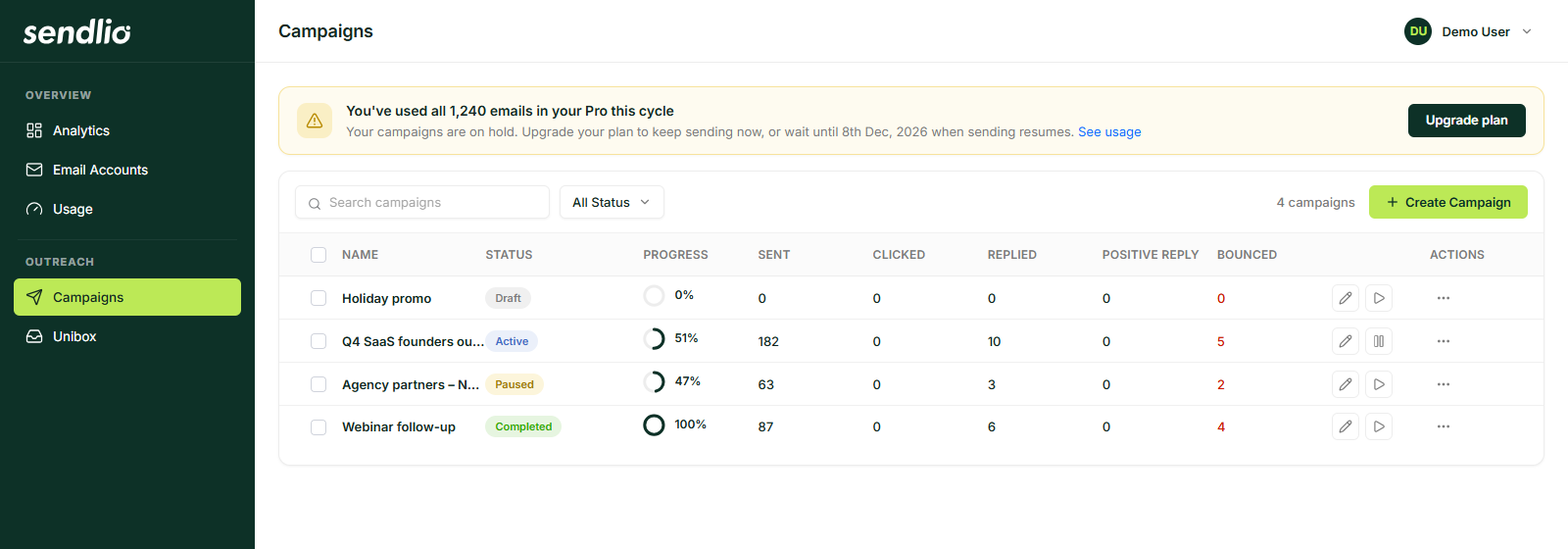
A banner appears: “You’ve used all N emails in your plan this cycle”. All campaigns go on hold — nothing is lost. Sending resumes automatically on the date shown, or right away if you Upgrade plan.
Note
Every email sent counts towards the quota, including emails from campaigns you later deleted.
When you reach your lead limit
You’ll see “You’ve reached your lead limit. Upgrade your plan!” when adding leads. Delete leads you no longer need, or upgrade.
Frequently asked questions
When does my quota reset?
Every 30 days from your plan’s start date. The banner shows the exact date.