
Preview, send a test email and check for spam words
See an email with real lead data, send it to yourself, and fix spammy wording.
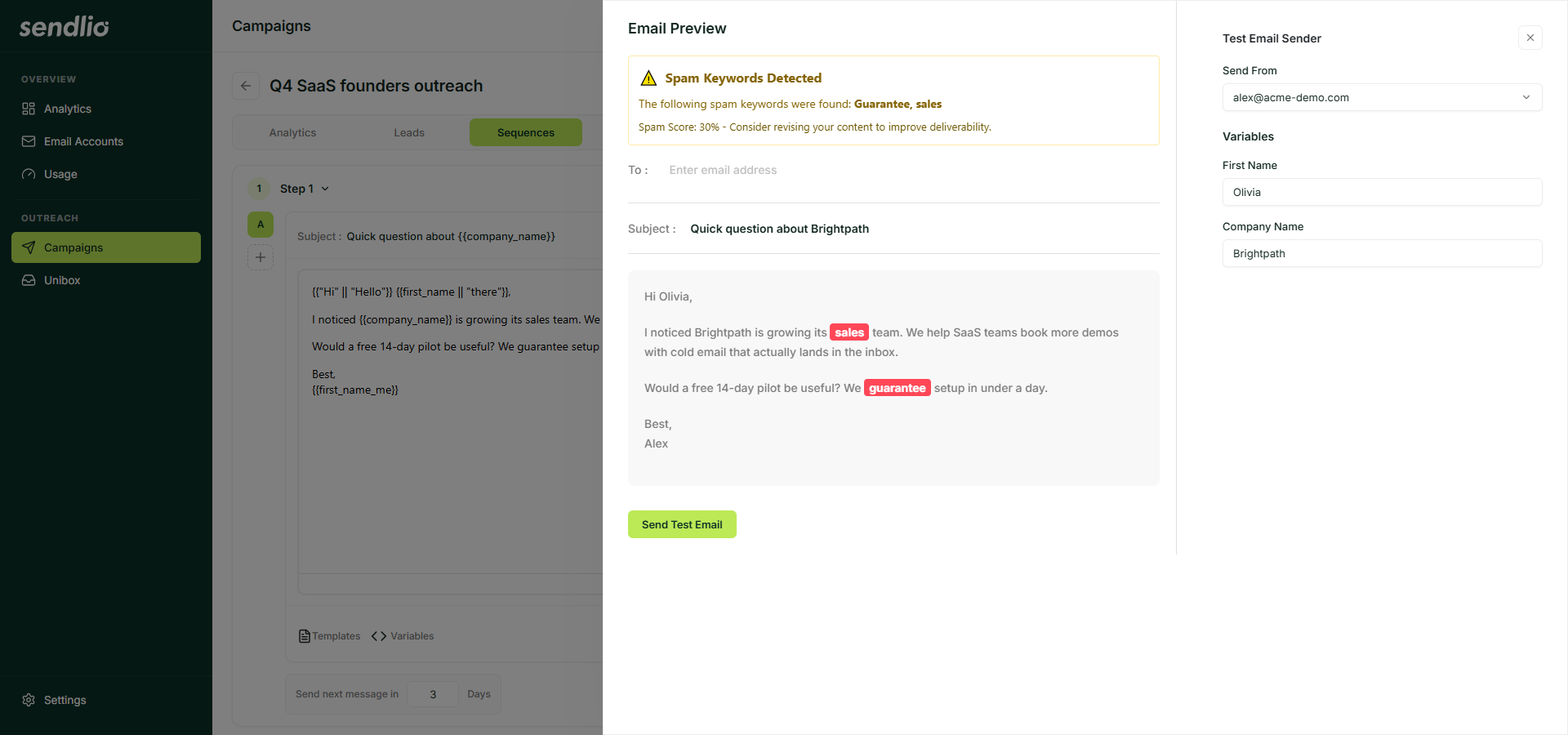
- In the Sequences tab, click Preview next to a step’s subject.
- The preview fills in variables using your first lead. Change values in Variables on the right to try other cases.
- To send a test: add your address in To (press Enter after each one), choose Send From, then click Send Test Email.
Note
The test email doesn’t include your signature. Real campaign emails do.
Spam word check
The preview scans your subject and body for words that spam filters dislike (like “Guarantee”, “Sales”, “Act now”) and highlights them in red with a Spam Score. “Great! No spam keywords detected.” means you’re clear.
The check is advice only — it never blocks sending. Rewrite flagged phrases where you can; a score under 30% is a good target.
Frequently asked questions
“Sender email is not valid” when sending a test
The test couldn’t be sent from that inbox. Check the inbox works (Email Accounts → Reconnect Account) or pick another sender.