
What is email warmup and how does Sendlio do it?
Why new inboxes land in spam, and how Sendlio builds their reputation automatically.
Email providers like Gmail and Outlook don’t trust an inbox they have never seen before. If a new inbox suddenly sends hundreds of cold emails, they send those emails to spam. Email warmup fixes this by building a history of normal, healthy email activity first.
How Sendlio warms up your inbox
Once you switch warmup on, Sendlio does all of this for you, every day:
- Sends real-looking emails from your inbox to other inboxes in the Sendlio warmup network.
- Gets replies — other inboxes reply to some of your emails, and your inbox replies to theirs. Conversations tell providers your emails are wanted.
- Rescues emails from spam — if one of your warmup emails lands in a spam folder, it is moved to the inbox and marked as read. This is a strong “not spam” signal to the provider.
- Spreads activity across the day with random gaps of several minutes between emails, so it looks like a person, not a robot.
Note
Warmup emails never go to your leads or customers. They only travel between inboxes in the warmup network, and they are hidden from your Sendlio Unified Inbox.
What you will see in Sendlio
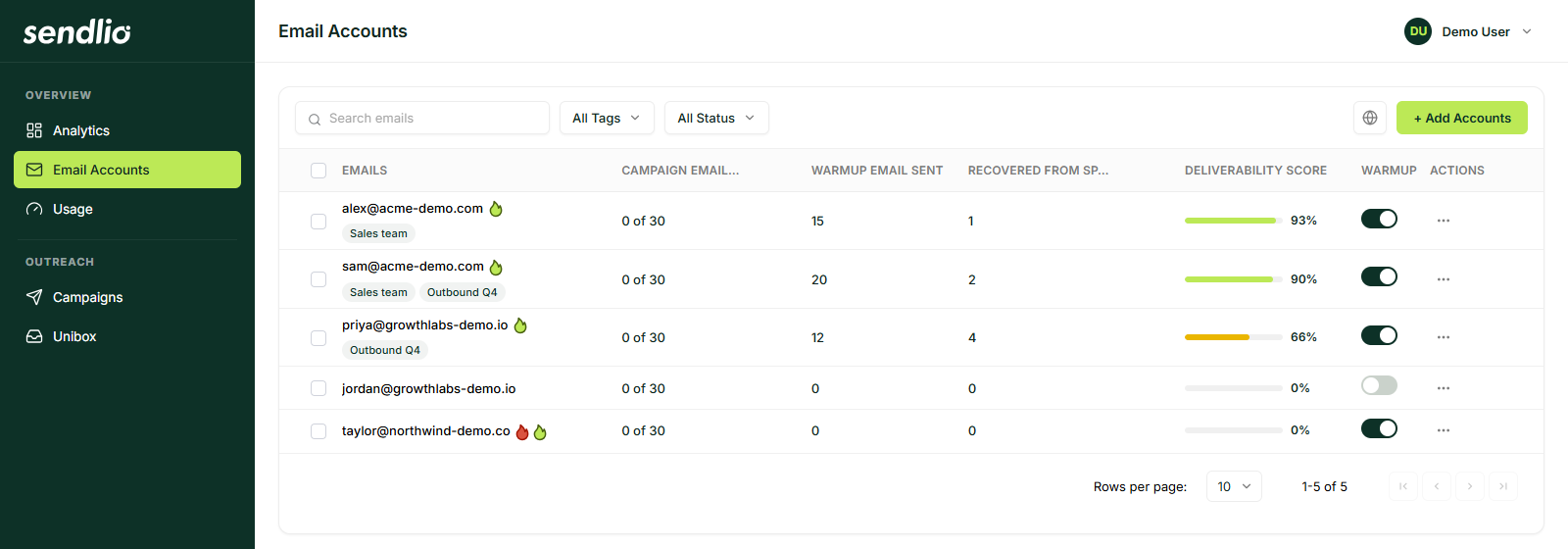
- A Warmup switch for each inbox on the Email Accounts page.
- Daily numbers for Warmup email sent, Warmup email received and Recovered from spam.
- A Deliverability score for each inbox and a Warmup Success Rate on the Analytics page.
Do I need warmup?
- New inbox or new domain: yes, always. Warm up for at least 2–3 weeks before sending campaigns.
- Older inbox that has never sent cold email: yes. Its reputation is for normal email, not outreach.
- Inbox that is already sending campaigns: keep warmup on. It protects your reputation while campaigns run.
Frequently asked questions
Will warmup emails show up in my inbox?
Yes, you will see them in your mail app (Gmail, Outlook, etc.). Each one has your warmup filter tag in the subject, so you can filter them into a folder. See “Use the warmup filter tag”.
Does warmup count towards my campaign sending limit?
No. Warmup has its own daily limit, set in the Warmup tab of each account.